threo.js > Sample Code for Three.js
All code on this page available on GitHub at examples
Cube Primitive
This is Three.js at its simplest most basic level - just a cube on a white background angled so you can see it is a 3D object. Have a look at the source code on GitHub. There are a number of useful options to try out just by uncommenting the source code.
Cylinder Primitive
The cylinder primitive offers many construction parameters. For example this primitive can be used to create a pyramid or cone or even a cube.
Plane Primitive
Note that the plane is constructed in the XY axis and that in three.js the Z-axis is the one that comes straight out of the screen towards the viewer.
Sphere Primitive
The sphere has only a few options: radius and number of horizontal and vertical segments. All the others such as position and scale are the same as the cube.
Camera
The camera has a number of special options. See the comments in the source code for details. By the way, the camera is invisible.
Four Primitives Used in One File
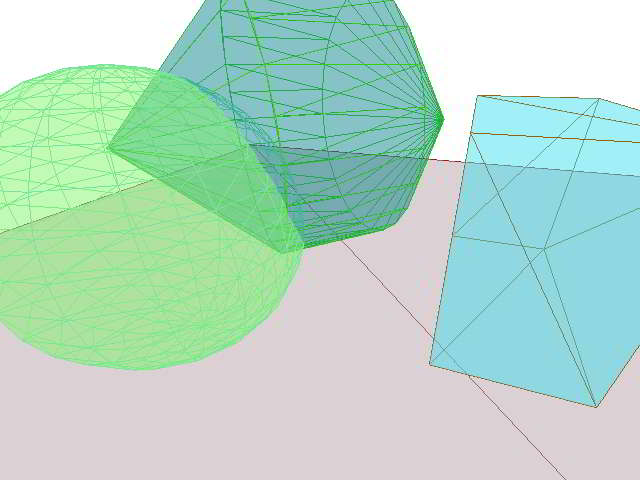
screen capture of 4 Primitives example.
Just for the fun of it, here is a file with four primitives: cube, sphere, cylinber with offsets all floting above a plane. This file gives you some ideas about placing, scaling and rotating primitives.
Updates
2011-02-02: The Camera file was added. Source code for most files was simplified even further. Additional text and links were added to this page.
Notes
These coding samples are built on top of three.js which is a lightweight 3D engine working over WebGL.
The simplest way tp see the sourcode is to use the view Page Source feature of your browser. Or you can view the sourcecode using GitHub.
The samples were created on top of the shortest, tightest "hello world"-type applet for three.js that I have been able to come up with so far. See the Cube Primitive for an example. My guess/hope is that if they were minified that each would be less that 1,000 bytes - not including the three.js files or the texture images.
Because of their tightness these files do not contain a warning that you need a browser that supports WebGL. Currently Internet Explorer does not support WebGL. Best to use Google Chrome or the beta versions of FireFox 4 and Safari 10.6 .
The Four Primitives Used in One File provides examples of both dot notation (object.scale.z = 5) and object notation ( {x: 0, y: 1, z: 2}) as well as the use of radians in order to calculate rotation angles. Generally objects are created using a unit one as the initial scale, radius or size factor.
Future editions of the files will add more comments and parameters such as position, rotation and scale to each primitive.
Theo Armour, 2011-01-23